Pingtunnel






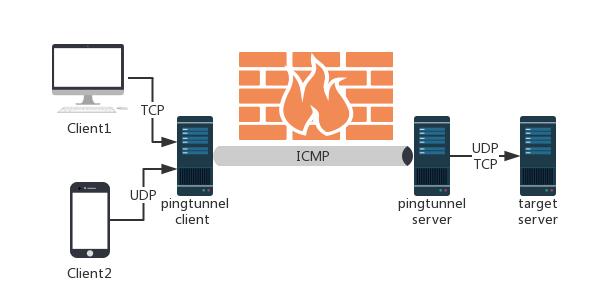
Pingtunnel is a tool that sends TCP/UDP traffic over ICMP.
Note: This tool is only to be used for study and research, do not use it for illegal purposes
Usage & Detailed Documentation
📖 For detailed documentation, see USAGE.md: includes complete command-line parameters, configuration file usage (
-c config.json), and setup guides for various proxy scenarios (global SOCKS5 proxy, TCP port forwarding, UDP forwarding, forward proxy, end-to-end AES/ChaCha20 encryption, etc.).
Quick Start
1. Server
- Prepare a server with a public IP (e.g.
www.yourserver.com) - Download the release package from releases (e.g.
pingtunnel_linux64.zip), unzip and execute with root privileges:
sudo ./pingtunnel -type server -key 123456
- (Optional) Disable system default ICMP echo response:
echo 1 > /proc/sys/net/ipv4/icmp_echo_ignore_all
2. Client
Run with administrator privileges:
- SOCKS5 Proxy Mode:
pingtunnel -type client -l :4455 -s www.yourserver.com -sock5 1 -key 123456 - Forward TCP (e.g. SSH/Web):
pingtunnel -type client -l :4455 -s www.yourserver.com -t 192.168.1.100:22 -tcp 1 -key 123456 - Forward UDP (e.g. DNS):
pingtunnel -type client -l :4455 -s www.yourserver.com -t 8.8.8.8:53 -key 123456
3. Config File Mode (-c)
Both client and server support JSON configuration files:
# Start server with config
sudo ./pingtunnel -c server.json

# Start client with config
./pingtunnel -c client.json
See USAGE.md for JSON configuration templates and rules.
Use Android Client
A dedicated Android client for pingtunnel is available, developed by the community:
Big thanks to itismoej for developing this Android client!
Use Docker
You can also start pingtunnel directly with Docker:
- Server:
docker run --name pingtunnel-server -d --privileged --network host --restart=always esrrhs/pingtunnel ./pingtunnel -type server -key 123456 - Client:
docker run --name pingtunnel-client -d --restart=always -p 1080:1080 esrrhs/pingtunnel ./pingtunnel -type client -l :1080 -s www.yourserver.com -sock5 1 -key 123456